
features
Everything the theme does, in one place
Search, or filter by who it helps. Every feature on this page is in the free package, and the optional ones have their own switch.
88optional features, each with its own switch
Shapes, styles and skins
A skin is a shape, a style and your colours. Pick a ready skin or build your own, and preview any of them in your own session before anyone else sees it.
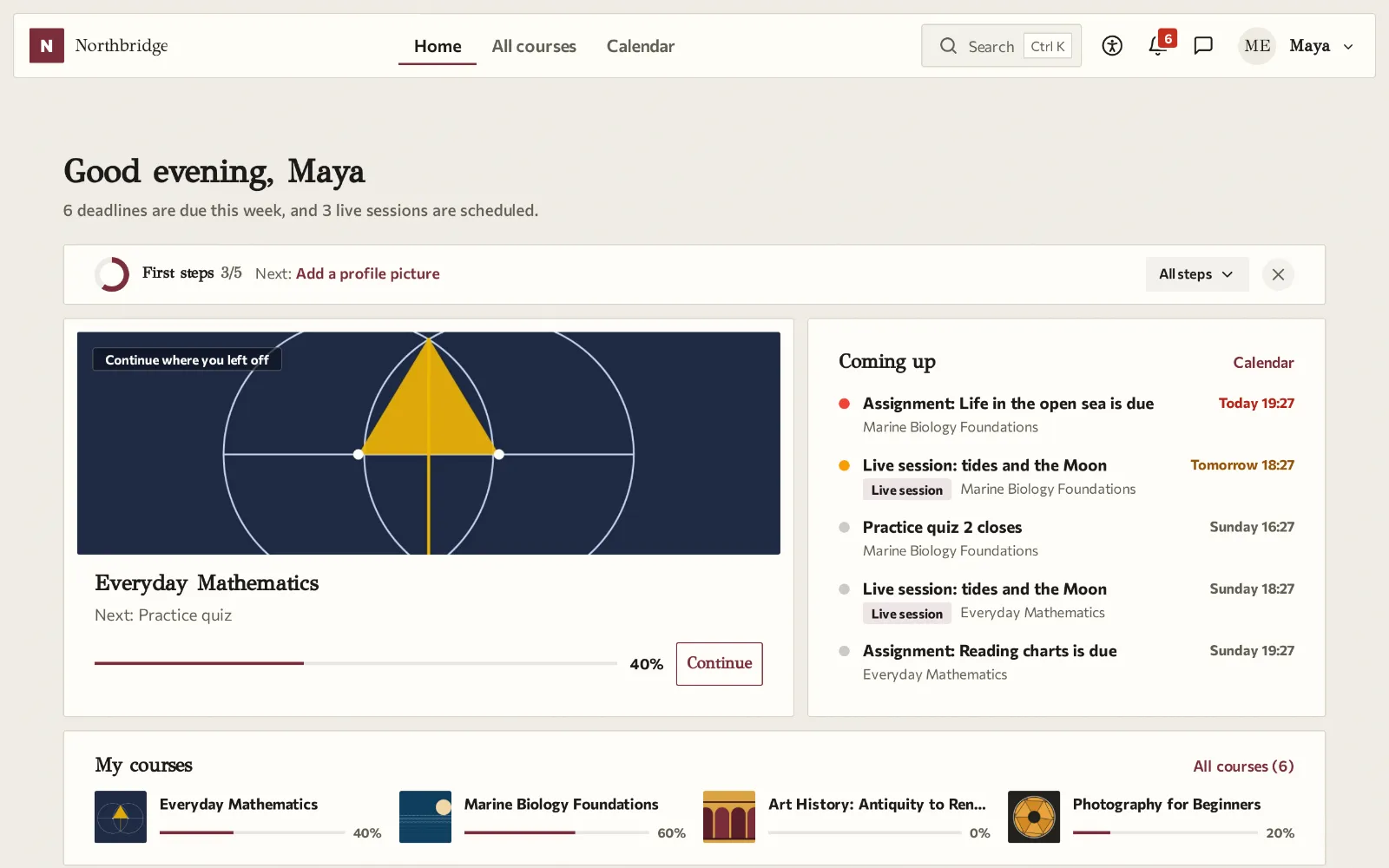
12 shapes and 10 styles
Shapes change the navigation and the dashboard, styles change materials, fonts, corners and shadows. Any shape works with any style.
22 ready skins
Complete looks for a school, a business, a public body, an academy and more, each a starting point you can change.
Light, dark and automatic
The dark appearance is drawn from the colours of the skin, and the automatic mode follows the device.
Skins per category or cohort
Different faculties, schools or clients get their own look on the same site.
Scheduled skins
A skin changes by itself between dates you set, for the site, a category or a cohort, and returns when the dates end.
Your colours, kept readable
A brand colour that is not readable is adjusted for text, and the settings show the contrast of every colour you choose.
Motion, width and icons
Full, little or no motion; full, normal or narrow content; activity icons in outline, filled or duotone sets.
The editor looks like the course
Inside the text editor, content takes the colours, fonts and corners of the skin, so teachers see what learners will see.
Right to left languages
Full support for right to left languages, and separate logos for the dark appearance.
Dashboard for learners
The first screen answers three questions: where was I, what is due, and what are my courses. Every piece of information shows once.
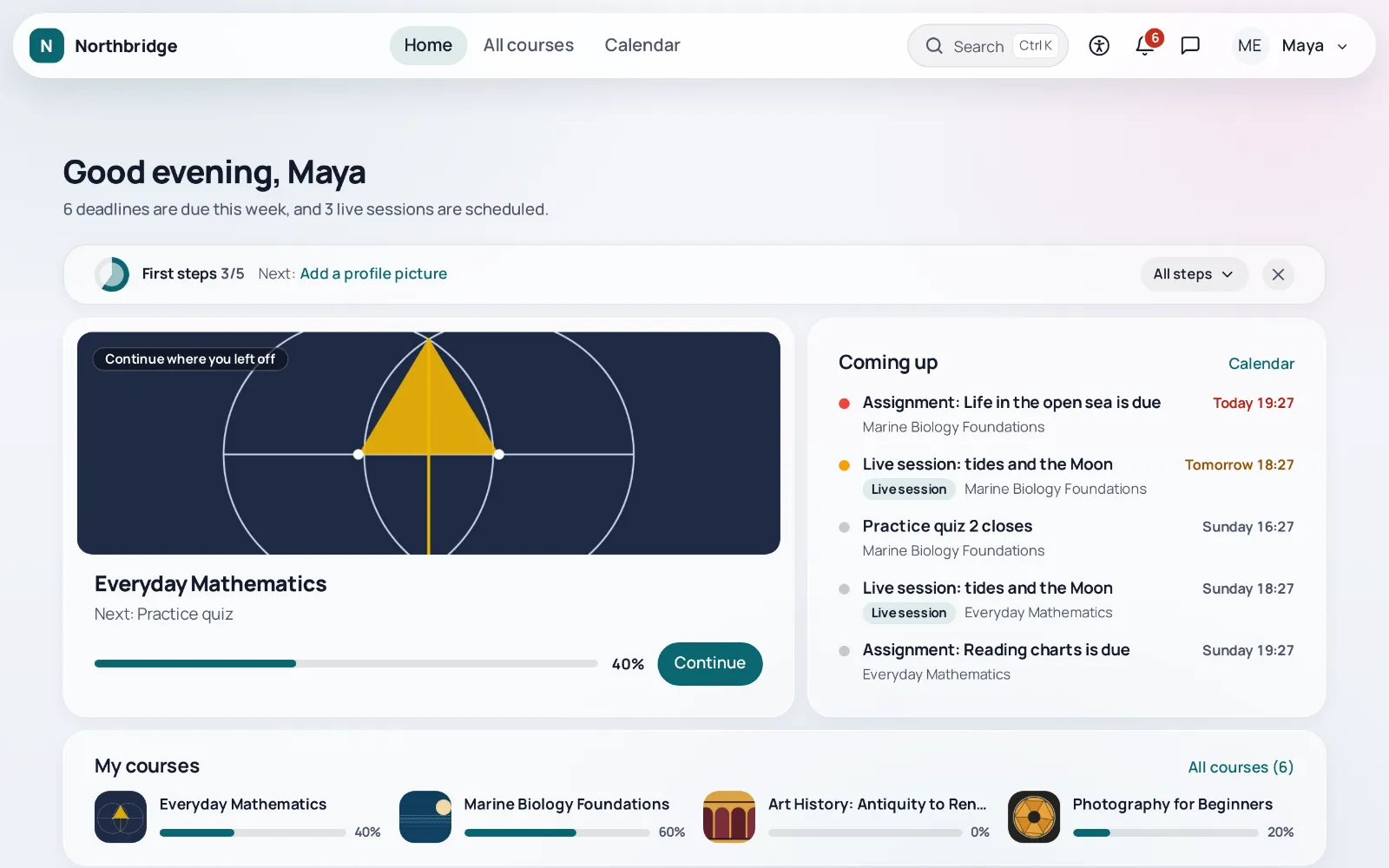
Greeting, Continue and Coming up
The next activity, the deadlines of the next two weeks and the courses of the learner, on the first screen.
Editable dashboard
Tiles and block regions inside the page, with an announcements tile and a layout that can be rearranged.
What is new for me
New grades and feedback, replies to my forum posts and new activities in my courses, newest first.
Skills, year in review, live sessions
Pages for skills, a year in review and live sessions next to My courses, with their cards on the dashboard.
Ctrl+K palette
One shortcut finds pages, courses, activities and upcoming deadlines, and for administrators also site settings.
Notes and collections
Notes on course and activity pages with a printable notebook per course, and bookmarks gathered into collections that can be shared with the course.
Messenger
A messaging interface on top of Moodle messaging, with quiet hours, notifications grouped by source and a short guide to choose what arrives.
Widgets for courses
Progress and study streak, the course team with office hours, announcements and live sessions, and quick links, in the block regions of the dashboard and the course pages.
Course pages
Course views that teachers choose per course, built into the theme, with the layouts of the Letstudy Course Format included.
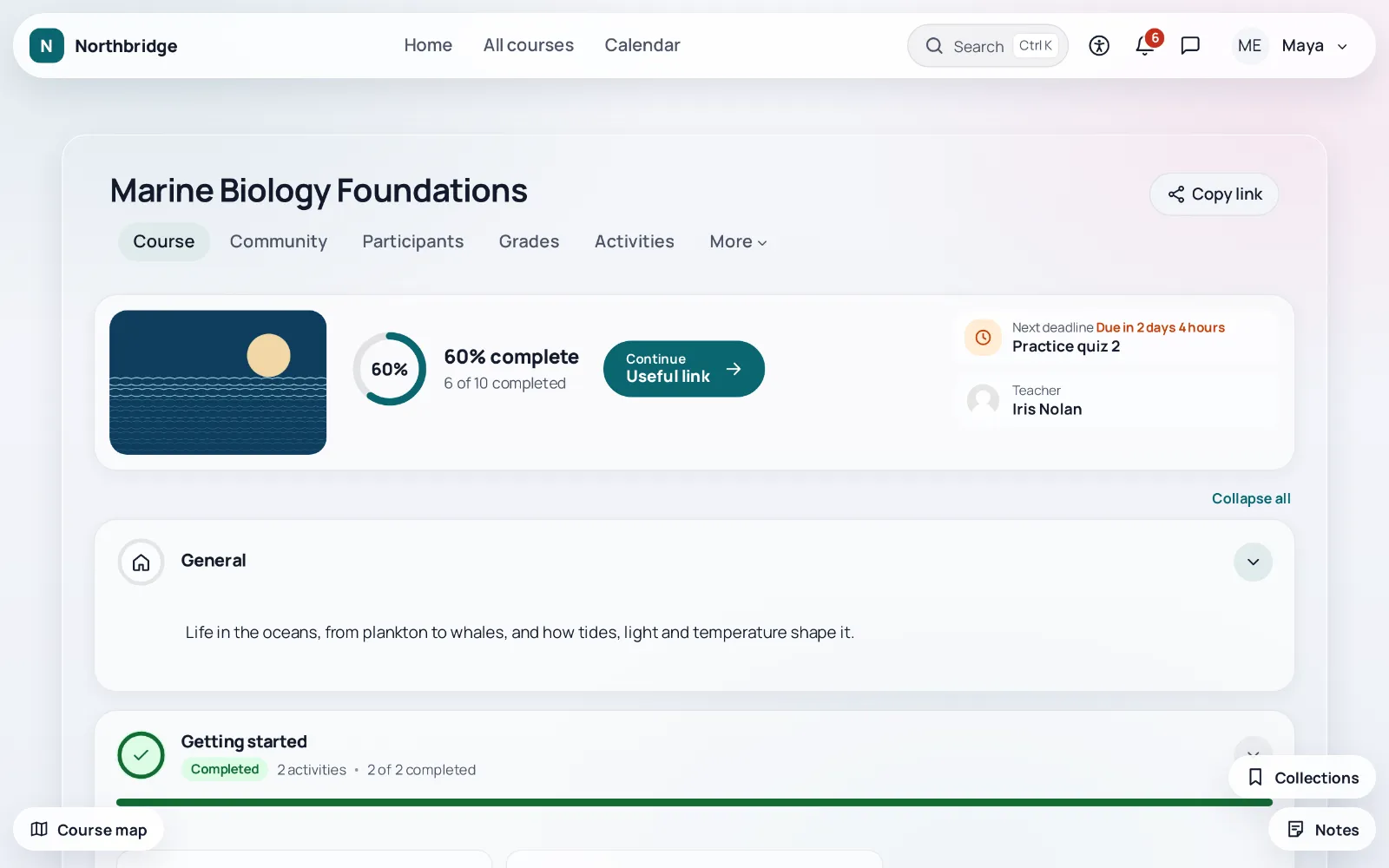
Course views
Journey, accordion, grid and board views, a course hero, a course map that marks the current activity, previous and next, and focus mode.
Course layouts in the theme
The layouts of the Letstudy Course Format, such as cards, list and timeline, with course options kept in course backups.
Journey canvas
A section becomes a map: a background image with the activities placed on it, each marked locked, available or completed.
Video playlist
A large player with the videos of each section beside it, Next, and playback that resumes where it stopped.
Video outline from captions
When a video has a caption or transcript file, its page shows an outline with times and key sentences, and the full transcript.
Course image and header
Choose which part of the course image shows in every card and shape, and place it behind the course title with contrast that is measured.
Clear to me, confused me
Under each activity learners say whether it was clear; teachers see counts and comments without names.
Tools for teachers
Less clicking around Moodle: what waits for you, who needs a follow up, and the dates of the whole course on one page.
What needs attention
Submissions to grade, quiz answers to grade by hand and unanswered discussions in every course you teach, under the greeting.
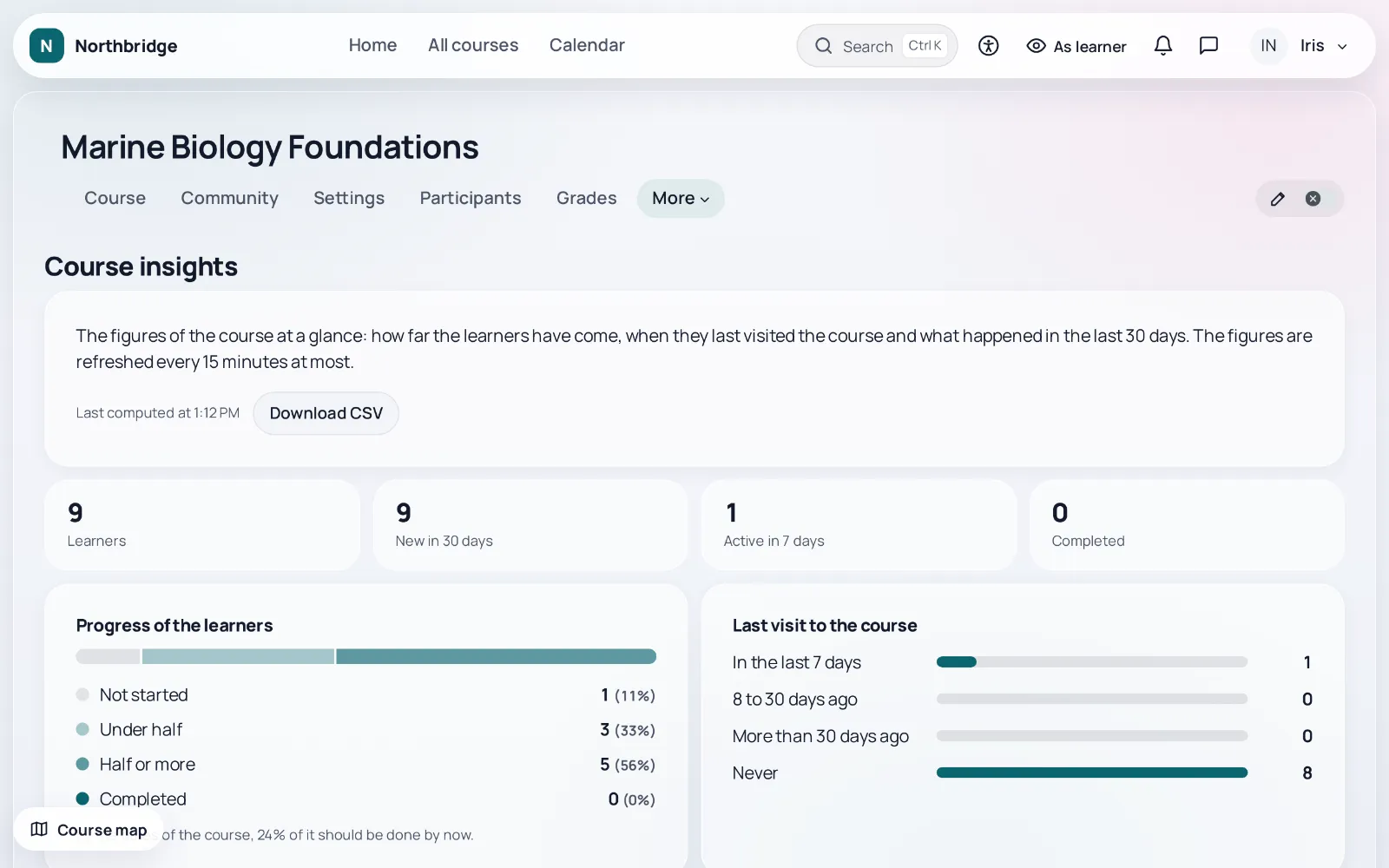
Course insights
Progress in four bands, last access, enrolments, quiz attempts, forum activity and submissions of the last 30 days, with a CSV download.
Learner follow up
Learners who have not started, are inactive or missed a date, with a message from a template that you review. Nothing is sent automatically.
Course dates
Every date of the course on one page, with a preview of a shift by a number of days.
Focus layout for grading
A wider grade panel with the rubric next to the feedback, on the assignment grader, the grader report and manual quiz grading.
View as learner
One button in the top bar shows the course as a learner sees it, and one click brings you back.
Course starters and saved sections
Start an empty course from a skeleton the administrator keeps, and save sections in a personal library to add them to other courses or sites.
Section translations
Write the name and summary of each section once per language, without multilang syntax.
Small things that save time
Course index controls, the full forum post form with preview, status hints at the top of the course, and teacher fixes of newer Moodle on older versions.
Community
Built on the forums, messaging and calendar of Moodle, so nothing is stored twice.
Course community
One tab with the announcements, the latest discussions with the filters Questions and Unanswered, the upcoming sessions and the group conversation.
Accepted answer
In question and answer forums one reply is marked as the answer, and the discussion shows as solved.
I will attend
Enrolled users answer for live sessions, and the teacher sees how many will attend and who.
Find a study group
Learners may choose to be listed as looking for classmates, with the times that suit them. Nobody is listed without choosing it.
Feed of my courses
The latest discussions and announcements of all my courses on one page.
Courses and enrolment
Help visitors choose a course with facts that come from Moodle itself, never typed in or invented.
Prerequisites
Courses required in the course completion appear as a chain on the course page and as prerequisites on the cards.
Honest numbers and real dates
Learner counts from real enrolments, shown only above a threshold you set, and countdowns only to real dates of enrolments and courses.
Found by search engines
The category pages of the course list of Moodle describe their courses and the path of the page for search engines (schema.org ItemList and BreadcrumbList), only when the site is open to them.
Works with popular plugins
Course ratings, Attendance, Level Up XP and Sharing Cart are shown in the theme when they are installed. None of them is required.
Mobile and offline
Made for the phone first: a bottom bar, a menu sheet and an installable web app.
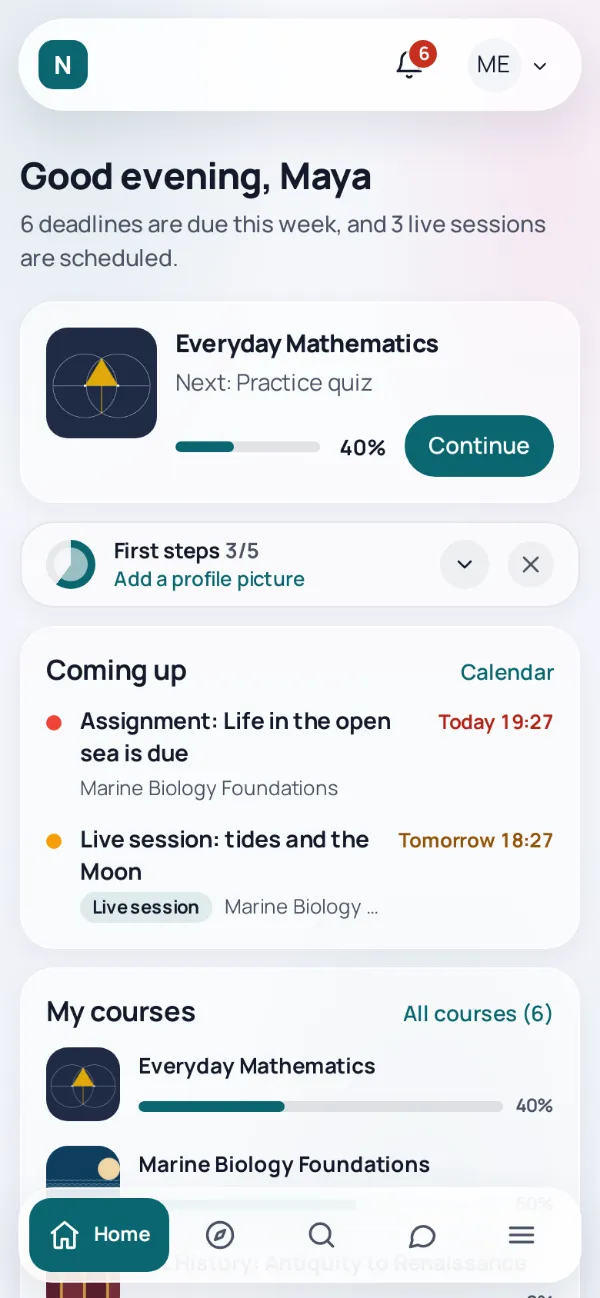
Phone bottom bar
Courses, course contents and search where they are needed, and search first in the menu sheet.
Installable web app
The site installs like an app, with a discreet invitation after visits on three different days.
Offline reading
Page resources of courses and PDF files get Available offline. The copy stays on that device and is deleted at logout.
Sent when the connection returns
A note or a forum post written offline waits in a visible queue and is sent when the connection returns.
Share to the site
On Android and Chromium the installed app appears in the share menu; text or a link becomes a note or a forum post after you confirm.
The look in the Moodle app
A stylesheet carries the colours and the font of the skin to the Moodle app, on sites where the app applies remote themes.
Setup and administration
Set up the theme in minutes, change it safely, and see the health of the site in one place.
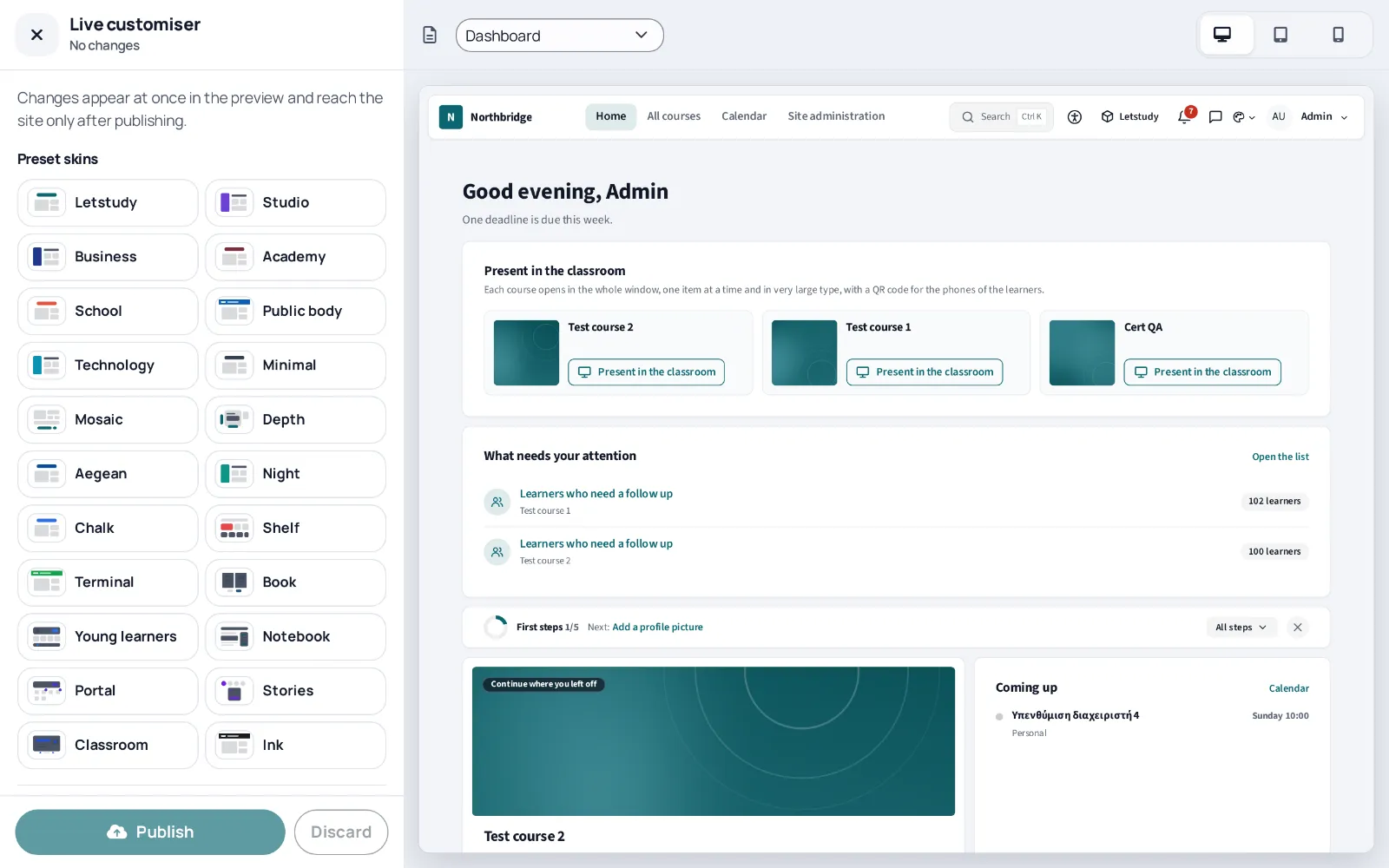
Setup wizard
Quick, standard or full setup that shows every change before saving, saved as one change you can undo.
Live customiser and history
Change the look and see it at once, with a history of settings and import and export of every setting.
Settings you can find
Six categories, advanced settings folded away, and a search field that finds any setting from a plain description.
One switch per feature
88 optional features, each with its own switch. A feature that is off leaves no trace on the site.
Login with identity providers
Order and hide the buttons of OAuth 2, SAML2, Shibboleth and CAS on the login page of Moodle, and hide the user name form on sites that sign in only with the account of the institution.
Sign up page design
The page for new accounts gets a layout beside a panel, centred or over a photo, with its own heading, text and image, while the fields and checks stay exactly as Moodle defines them.
Menu builder
Links, drop down menus, mega menus with columns and live lists of courses in the main navigation, each for the audience you choose. Without items nothing changes.
Preview before switching
While the site uses another theme, an administrator sees the site with Letstudy in their own session only.
Import from another theme
Lists the settings of another theme of the site with a proposed Letstudy setting. Nothing is applied before you confirm every choice.
Health check
The theme, the Moodle app, cron, failed tasks, backups and plugins ready for the next Moodle version, read on the server and sent nowhere.
New looks for admin pages
Site administration, course management and account pages in the look of the theme, each with its own switch.
Procurement summary
A one page PDF for procurement and IT committees, with versions, the modules that are on, the data the theme stores and the accessibility report.
Privacy and compliance
Respect for the people who use the site is built in, not added later.
Nothing from other servers
The theme loads no fonts, scripts or styles from other servers. Fonts and libraries are bundled.
Cookie consent
Analytics such as Matomo or Google Analytics load only after the visitor consents in the banner of the theme.
Videos load on play
YouTube in privacy enhanced mode and Vimeo with do not track in course content load only when the visitor presses play.
Privacy API
Every kind of data the theme keeps is declared in the Privacy API of Moodle, for exports and deletions.
Withdrawal from online purchases
A page and a button for the right of withdrawal of Directive 2011/83/EU, as a template you adapt. Not legal advice.
Open about AI
The EU icons for AI generated content, a notice in every AI assistant, a public page about the use of AI, an AI statement per course and a log of AI drafts and who reviewed them.
Optional AI helpers
Course outline, video digest and the notebook assistant work only when your site has an AI provider set up in Moodle. Drafts for courses are created only after a teacher approves them.
Accessibility
Display preferences for every learner, checks for every teacher and the documents that public bodies ask for.
Display preferences
Text size up to 200 %, line and letter spacing, contrast and reduced motion, saved for each user.
Ready profiles
Low vision, Less motion and Reading focus set several preferences in one click, with a cream or soft grey reading background.
Reading guide and calm reading
A line or a mask that follows the pointer or the focus, and a switch that hides everything that is not content.
Course accessibility check
Missing alternative texts, skipped headings, vague links, tables without headers, low contrast and videos without captions, with a link to fix each one.
Plain language check
A quiet line under the editor points out very long sentences, long paragraphs and vague link texts, in Greek and in English. It runs in the browser.
Captions and abbreviations
A reminder to add captions when a video is uploaded, and the expansion of every marked abbreviation for every reader.
Statement and report form
An accessibility statement generator following Implementing Decision (EU) 2018/1523, and a form where anyone reports a problem.
Conformance report
An Accessibility Conformance Report in the VPAT 2.5 INT format, for what the theme adds to Moodle.
No feature matches this search.